Quick answer
A fax confirmation page records the transmission result reported by the sending service. It can show the destination, timestamps, page count, and final status, but it does not prove that a person opened, read, or processed the document.
A fax confirmation page is a record of what the sending fax system reported after a transmission attempt. Depending on the machine or online service, it may also be called a fax receipt, transmission report, activity report, or delivery confirmation.
The most useful confirmation identifies the destination, records when the fax was sent and completed, shows how many pages were transmitted, and gives a final status. Keep one important limitation in mind: a successful transmission result does not prove that a particular person opened, reviewed, accepted, or acted on the document.
How to confirm a fax was received
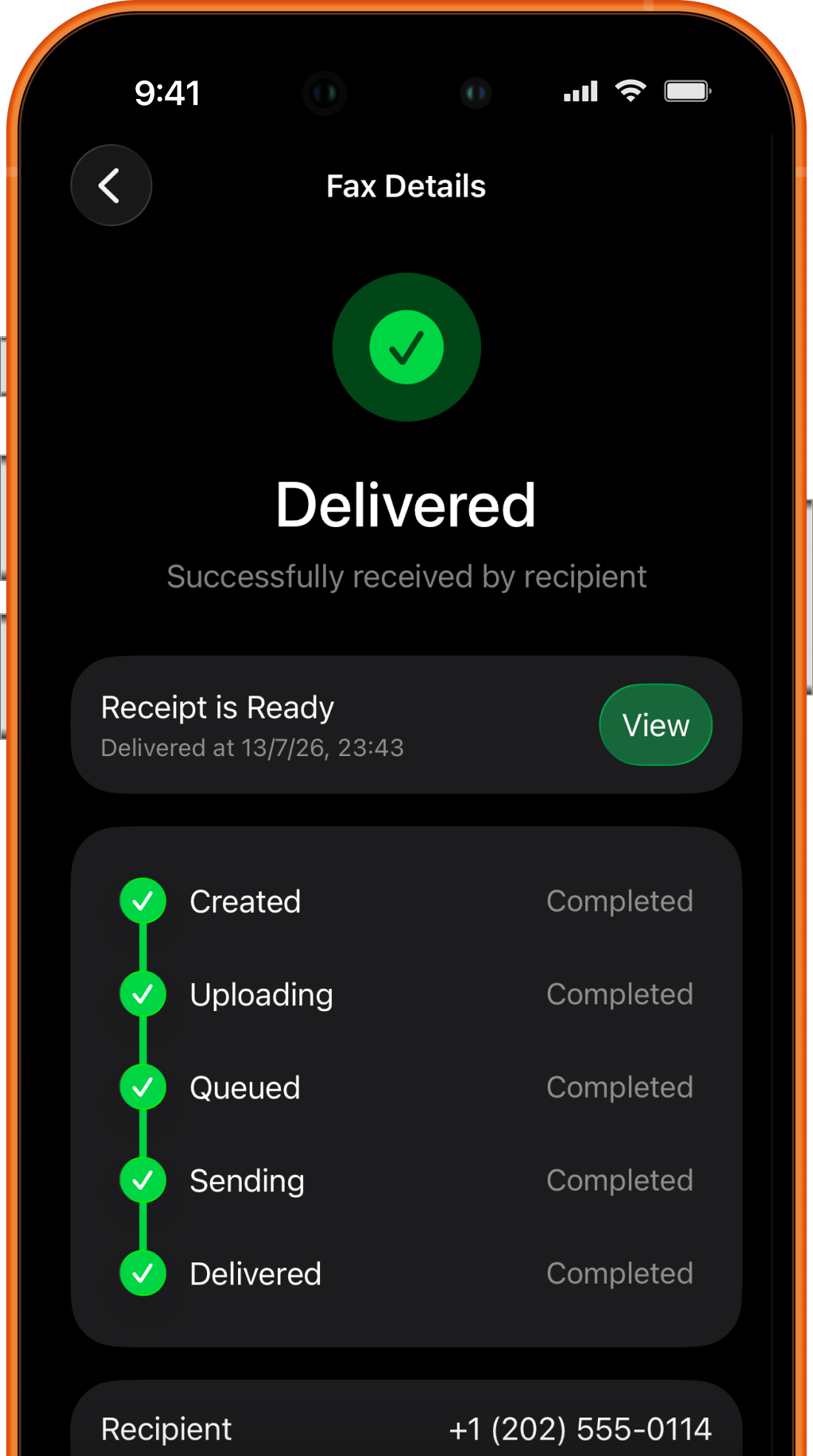
Open the sending service’s final transmission report and match the destination number, completion time, and page count to the fax you intended to send. In Fax Prime, look for Delivered, then open View under Receipt is Ready. If you need to know whether the receiving office has located or processed the document, obtain its separate acknowledgment through an official contact or portal.
Use the result to choose your next step:
| What you see | What to do next |
|---|---|
| Uploading, Queued, or Sending | Wait for a final result; these states do not confirm delivery. See the status explanations. |
| Delivered, with the expected number and pages | Open and keep the receipt together with the exact document you sent. |
| Not delivered | Read the failure reason and use the troubleshooting checklist before retrying. |
| Delivered, but the recipient cannot find it | Check the destination and internal routing with the recipient before sending a duplicate. |
Fax confirmation page, receipt, and transmission report
These terms often describe the same general record, but the format varies by service:
- A fax confirmation page is the familiar one-page summary produced after a transmission.
- A fax receipt is another name for a saved confirmation record.
- A transmission report may include successful and failed attempts rather than only completed deliveries.
- An activity log can show several faxes and their changing statuses over time.
The label is less important than the information inside. Before relying on a record, make sure it identifies the correct destination and the final result for the exact document you intended to send.
Fax Prime creates a viewable receipt for an outgoing fax after its status reaches Delivered. The fax details screen also preserves the progress from creation through delivery, so you can distinguish a final result from an upload or transmission that is still underway.
What a useful fax confirmation shows
Fax systems do not all expose identical fields. A useful report normally gives enough information to connect the result with one transmission.
| Field | What it helps you verify | Important limitation |
|---|---|---|
| Final status | Whether the service reported delivery or a failure | It does not identify the person who handled the fax |
| To | The fax number used as the destination | A correctly formatted number can still belong to the wrong office |
| From | The sending number, when one is assigned and shown | It may identify the service line rather than a personal phone |
| Sent | When the transmission workflow began | A start time is not the completion time |
| Delivered | When the service recorded the final successful result | It is not a human-read timestamp |
| Pages Sent | How many document pages the report associates with the fax | Compare it with the intended file and any cover sheet |
The current Fax Prime Fax Confirmation Report includes the status, Sent and Delivered times, From and To fax numbers, Pages Sent, and page previews. Those previews help connect the receipt to the transmitted document without forcing you to identify it from a filename alone.
If a recipient gave you a case number, claim number, or other reference, keep that reference with the receipt in a way that follows the recipient’s privacy rules. Do not add unnecessary sensitive information merely to make a record easier to search.
How to read Fax Prime delivery statuses
The status timeline answers two different questions: where the fax is now, and whether the result is final.
- Draft means the fax has not been submitted. You can still review or change it.
- Uploading means Fax Prime is preparing and transferring the document before delivery can begin.
- Queued means the fax is ready and waiting for the delivery service to start sending.
- Sending means the service is attempting transmission to the recipient’s fax number.
- Delivered is the successful final state. Fax Prime can make the receipt available at this point.
- Not delivered is a final failure state. Open the fax details to read the reason before deciding whether to resend.
Uploading, Queued, and Sending are not confirmations. Avoid creating a duplicate simply because one of these states remains visible for a few minutes. Wait for the final result unless an urgent deadline or a specific instruction from the recipient requires another action.
If the result is Not delivered, use the exact reason shown in the app. The next step differs for a busy recipient line, a number that does not return a fax signal, a document that is too large, and an account issue. The failed-fax troubleshooting checklist explains those paths separately.
What Delivered does—and does not—prove
A Delivered status is meaningful evidence that the transmission system completed its fax interaction with the destination endpoint. It is stronger than a draft, an upload progress bar, or a record showing only that Send was tapped.
However, a fax confirmation does not prove that:
- the intended employee personally read the pages;
- the fax was routed to the correct department after arrival;
- an agency accepted the document as a valid filing;
- a claim, application, or request was approved;
- every visible detail remained legible to the recipient;
- a deadline was satisfied under a particular rule or contract.
A shared fax machine may accept the transmission before staff remove the pages. An online fax inbox may receive the file before anyone opens it. A correct destination can still require a cover page or reference so the receiving organization can match the fax to the right record.
For legal, medical, tax, insurance, or deadline-sensitive paperwork, follow the recipient’s stated confirmation process. That may include calling an official number, checking a case portal, or waiting for a separate acknowledgment. A fax receipt is part of your record, not a substitute for recipient-specific requirements or professional advice.
How to open and keep a receipt in Fax Prime
After the fax reaches Delivered, open it from the Fax Prime history and look for Receipt is Ready. Select View to open the generated confirmation report.
Review the report before storing it:
- The To number matches the authoritative number supplied by the recipient.
- The Sent and Delivered times correspond to the intended attempt.
- Pages Sent matches the document and cover sheet you expected to transmit.
- The report shows Delivered rather than a pending or failed state.
- The page previews belong to the correct document and contain no accidental pages.
Use the available iOS document controls to save or print the receipt when you need a separate record. Store it together with the exact final document, not a later edit or an unsigned draft. If you export either file to email, Files, cloud storage, or another system, that exported copy has its own access and retention risks.
When should you keep a fax receipt?
Keep the confirmation when the transmission relates to a deadline, authorization, payment, dispute, application, claim, medical request, or other workflow where you may need to reconstruct what happened. Your organization or the recipient may have a specific retention policy; follow that policy rather than keeping private documents indefinitely.
For a routine fax, it may be enough to retain the record inside the app until the recipient confirms processing. For important paperwork, keep these items together:
- the exact document version that was sent;
- the fax confirmation report;
- the official recipient instructions or notice;
- any separate acknowledgment from the recipient;
- a note about a corrected resend, if one was required.
Do not assume that a screenshot of a Delivered label contains the same detail as the full confirmation report. The report is more useful because it connects the status with destination, time, page count, and the transmitted pages.
What to do when the recipient says the fax is missing
Start by comparing facts instead of immediately resending the same document.
- Confirm that your receipt shows Delivered and not merely Queued or Sending.
- Compare the complete destination number with the recipient’s current official number.
- Check the delivery time, page count, and page previews.
- Ask the recipient to check the correct department, digital inbox, shared machine, or internal routing queue.
- Share only the non-sensitive confirmation details they need to search for the fax.
- Resend only after you know whether the original may still be found and how duplicates should be labeled.
If the report shows the wrong number, treat that as a misdirected fax rather than proof of successful delivery to the intended organization. Follow the appropriate privacy or incident procedure and contact the intended recipient through a verified channel.
If the number is correct but the organization cannot locate the fax, ask how it wants a replacement labeled. A cover sheet marked “Resent,” with the original date and a safe reference, can help staff avoid processing both copies. Use the free fax cover sheet generator to put that reference in the subject or message, set the current transmission date, and download the completed PDF. Count the replacement’s pages again, including its cover.
Frequently asked questions
Is a fax confirmation page proof of delivery?
It records the delivery result reported by the fax system and can be useful evidence of transmission to the destination endpoint. It does not prove that a named person read, accepted, or processed the document, and it does not by itself establish compliance with a filing rule or deadline.
Does every fax have a confirmation page?
The available record depends on the machine, app, or service. Fax Prime makes a receipt available for a fax after it reaches Delivered. A fax that is still Uploading, Queued, or Sending does not yet have a final delivery result.
What if the page count on the receipt is wrong?
Compare the report with the exact document and cover sheet you intended to send. If pages are missing, contact the recipient before resending and correct the source file or assembly. Label a replacement clearly so two versions are not mistaken for one complete transmission.
Can I use a receipt for a court, tax, medical, or insurance deadline?
Keep the receipt, but follow the instructions of the specific court, agency, provider, or insurer. Rules about accepted delivery methods, deadlines, and evidence vary. A fax status cannot promise that a submission was legally filed or administratively accepted.
How do I get a fax confirmation from my iPhone?
In Fax Prime, wait until the outgoing fax shows Delivered, open the fax details from history, and select View under Receipt is Ready. Check the report fields, then save or print it when a separate copy is appropriate.
Product behavior reviewed September 4, 2026 against the current Fax Prime status and receipt workflow. Labels and available controls can change with app updates.